
Let me guess , someone told you about HappyMod, or you stumbled upon it while trying to unlock something in a game. Now you're sitting here wondering is happymod safe to use ? or if you're about to do something stupid with your phone.
I get it. I had the same question the first time I heard about it.
So instead of giving you a bunch of copy-paste warnings that don't actually help, let's just talk about it properly . what HappyMod is, what the real risks look like, and how to protect yourself if you decide to use it.
What is HappyMod and how does it work?
HappyMod is basically a community-run library of modded Android apps and games. It’s not run by a big company , regular people upload the files. Someone knows how to remove ads from an app, unlock a premium version of something, or tweak a game to give you unlimited resources and then they share that modified APK file on HappyMod so everyone else can get it too.
Since none of this goes through Google Play, your phone won’t install anything from HappyMod by default. You have to go into your settings and allow installations from outside the Play Store first. Then HappyMod acts like its own little app store you find what you want, download it, and install it.
Honestly, the concept isn’t new. People have been passing around modded APKs forever. HappyMod just made the whole thing more organized and easier to navigate. Whether that's a good or bad thing depends on how you approach it.
Is HappyMod a virus?
No, the HappyMod app itself is not contain virus.
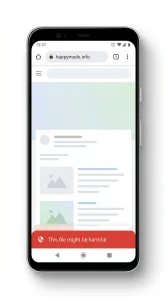
Now I know it's hard to believe when Chrome throws a scary red warning at you when you try to download it. But here's the thing that warning isn't actually specifically about HappyMod. It appears by default for every APK file downloaded from outside the Google Play Store. Every single one, no exceptions.
The reason is pretty simple. Apps on the Play Store go through Google's review process before they reach you. Third-party APKs skip this entirely, so Google's response is basically: We didn't look into it heads up. Chrome sees an APK that comes from a non-Play Store link and the warning is automatically triggered. This malware detection isn't about catching anything dangerous. This is just standard Android policy.
So when that warning pops up when you're downloading HappyMod, your phone doesn't have a virus. It's just doing what it always does with outside APKs. The actual HappyMod platform app itself - when you get it from a real, legitimate source - is clean. Security researchers have seen it. It's not secretly harvesting your data or doing anything suspicious in the background.
It's worth knowing about the warning. It's not just proof that HappyMod is dangerous.
User-Uploaded Content Vulnerabilities
The same thing that makes HappyMod useful is also what makes it dangerous. Since anyone can upload a mod, you have no real way of knowing who created the file you’re downloading or what’s actually inside it.
HappyMod uses automated filters and reports malicious files to users. But no such system catches everything. Every once in a while, a modified APK comes along with something hidden inside it – maybe just annoying adware running silently in the background, or maybe something else like spyware or a Trojan wrapped inside an otherwise active game.
Sometimes the uploader did it on purpose. Sometimes they grabbed the file from somewhere else and shared it without realizing it was already compromised. Either way, you’re stuck with it on your phone.
With the Play Store, you’re trusting Google’s process. With HappyMod, you're trusting a stranger. That's the honest truth of it. Most files are fine - but most everything isn't, and that's the difference.
Misuse of app permissions
This one's sneaky, and a lot of people miss it entirely.
When you install any app, Android asks you to grant it certain permissions. Your navigation app wants your location. Your voice recorder wants a microphone. It all makes sense - permissions are given based on what the app needs to do.
But what if you're installing a simple offline puzzle game and it asks for access to your contacts? Or your
How to avoid fake HappyMod clones.
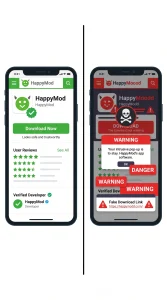
This is something that doesn’t get talked about enough, and it’s responsible for a lot of really bad experiences when people say HappyMod gave me a virus.In many of these cases, they weren’t actually on HappyMod. They were on a fake.Since HappyMod is well-known, scammers create copycat websites that are designed to look almost identical to the real thing same logo style, same color scheme, same layout. Some of them are surprisingly convincing at first glance. The only thing different is what you actually download. Instead of a working modified app, you get malware.These clones pop up in search results, are shared in group chats, and circulate on social media. People land on them thinking they’ve found the real site and download whatever is being offered without thinking.
Here's how to spot them before it's too late:
Take a close look at the URL: Clone sites almost always use a slightly tweaked domain an extra letter, a hyphen where there shouldn't be one, a different extension. The real site has an address. If the URL looks even slightly wrong, close the tab.
Watch how the site behaves when you arrive: Fake clone sites are aggressive quick pop-ups, fake warnings that tell you your phone is already infected, download buttons that appear before you ask for anything. Legitimate platforms don't require you to panic to download something.Check if the site actually works. Real platforms feature working navigation, real user reviews, up-to-date ratings, and a real community. Hastily built fake sites often have broken links, generic placeholder text, and pages that go nowhere.
Only use sources that you've verified.:A quick search to verify whether a link is legitimate before downloading is worth the extra minute. Don’t just click on the first result Google gives you and assume it’s legit.
How to Install Mod APKs Safely ?
Even when you're pretty confident about where a file came from, a few simple habits can make a real difference. Here's what people who've been doing this for a while actually do.
Step-by-Step Checklist :
Run the file through VirusTotal before you install anything:
VirusTotal is a free online scanner that checks your file against over 70 different antivirus engines at once and gives you a full breakdown in seconds. It probably takes a couple of minutes and is honestly the single most useful thing you can do before installing a modified APK. If everything comes back clean, great. If more than one engine flags something, delete the file and move on it’s not worth it.
Keep a mobile antivirus app running in the background:
Something like Malwarebytes or Bitdefender for Android runs silently and catches things even when you’re not actively paying attention. Think of it as a safety net for those moments when something slips through your own screening. You may never need it to save you but when you do, you’ll be so glad it was there.
Don’t sign in to your real accounts inside modded apps:
This is one of those things that seems obvious but catches people all the time. Don’t log in to your real Google account, Facebook, or anything else that’s tied to your real identity or payment information. Some mods have tools designed to capture your login credentials as you type them in. If the game requires an account, create a throwaway one just for that purpose. Your real accounts are not worth gambling with.
Use a VPN when you’re accessing third-party content:
A reliable mobile VPN ProtonVPN and Mullvad are both solid options encrypts your traffic and hides your IP address when you’re communicating with servers that don’t pass through Google’s infrastructure. It won’t protect you from every possible threat, but it does close off a real avenue for data interception, especially if you’re ever doing so on public Wi-Fi where your connection is already exposed to more people than you realize.
None of this makes editing completely bulletproof that’s not how it works. But following even one or two of these habits will put you in a much safer position than someone who blindly downloads and hopes for the best. Be smart about it, pay attention to the warning signs, and you’ll be fine.
Download Happymod for free without virus